Interfaces

Intelligent Data Capture for Structured , Scalable Operations

Design, deploy, and manage powerful intake interfaces, without writing a single line of code. AutoOps Custom Interfaces replace scattered emails, spreadsheets, and chat threads with structured, validated, workflow-ready submissions. Every request follows defined rules and captures consistent, reliable data from the start, ready for approvals, reporting, automation, and compliance.With structured intake as your foundation, operations become controlled, data becomes trustworthy, and execution scales with confidence.
What are Custom Interfaces?

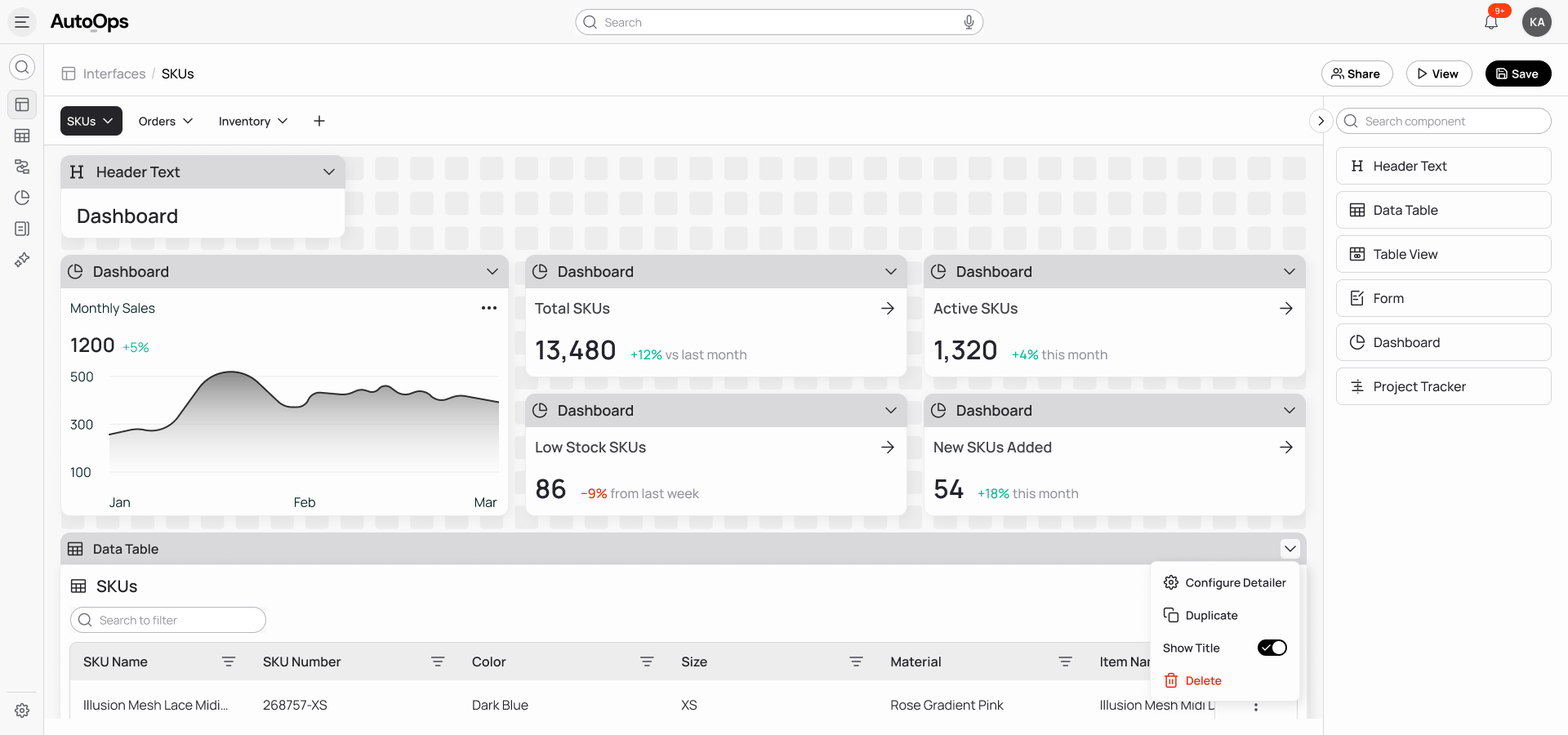
Custom Interfaces represent the structured intake layer inside AutoOps. They allow organizations to convert backend data tables into dynamic, guided, and fully controlled form experiences that align directly with operational processes.Whether you are managing vendor onboarding, client intake, procurement requests, internal approvals, compliance documentation, or customer submissions, Custom Interfaces ensure that all required information is captured correctly the first time. Each form is directly connected to your data model and workflow engine, meaning submissions are not isolated entries but active components within your operational system.

When a user submits a form, the platform validates the input, applies defined logic, and routes the request automatically according to your rules. This eliminates delays caused by incomplete submissions, prevents inconsistent data entry, and ensures that every request is handled with accuracy and accountability.

How It Works

1
Convert Data Tables into Structured Forms
Instantly transform any AutoOps data table into a fully mapped intake form. Fields auto-generate from your schema, ensuring seamless alignment between interface and database.
2
Design a Clear and Guided Experience
Structure forms with intuitive layouts, sections, and contextual guidance so users know exactly what to submit, driving higher completion rates and cleaner data.
3
Apply Intelligent Logic and Validation
Embed dynamic conditions, auto-calculations, and advanced validations to stop errors before submission and enforce accuracy at the source.
4
Connect Submissions to Workflows
Trigger approvals, task assignments, escalations, notifications, and updates automatically, turning every submission into a controlled operational process.
5
Preview, Publish, and Iterate with Confidence
Test the full experience before launch and refine anytime with version control, without disrupting live operations or compromising data integrity.

Core Capabilities

Visual Form Designer
The drag-and-drop Form Designer enables business users to create enterprise-grade forms without requiring technical expertise.
Field creation and customization with full property control
Multi-column layouts, structured sections, and tabbed configurations
Conditional logic configuration through an intuitive interface
Direct mapping between form fields and backend tables
Versioning, publishing controls, and rollback capability
Role-based access for creation, editing, and submission
Advanced Conditional Logic
Dynamic logic transforms static forms into guided, context-aware experiences.
Multi-layered conditional visibility rules
Nested AND / OR decision trees
Threshold-based comparisons and calculated expressions
Conditional mandatory enforcement
Real-time auto-population and derived values
Robust Validation Engine
Data integrity begins at the point of entry. Custom Interfaces provide comprehensive validation controls that protect your system from incomplete, inaccurate, or inconsistent data.
Field-level validation constraints
Cross-field dependency checks
Real-time error messaging and correction prompts
Prevention of invalid submission states
JSON Editor for Advanced Configuration
For advanced users and complex enterprise scenarios, AutoOps provides access to the full underlying JSON configuration of each form.
Direct modification of field properties and behaviors
Complex chained logic and nested conditional structures
UI layout overrides beyond the visual designer
Custom confirmation and post-submission experiences
Reusable and version-controlled configuration blocks
Theme Import and Branding Standardization
Organizations can maintain visual consistency and brand alignment across all interfaces by importing pre-configured JSON themes.
Instant application of colors, typography, spacing, and layout styling
Reusable theme configurations across multiple forms
Rapid deployment of department-specific or client-specific variations
Reduced reliance on design or front-end resources

Why AutoOps Custom Interfaces are Different

Many tools offer basic form functionality. Few integrate deeply with operational data models and workflow orchestration.

Capability

Manual Processes

Legacy Solutions

AutoOps Workflow

Direct backend table mapping
Not Available
Limited
Limited
Dynamic multi-layer logic
Not Available
Limited
Limited
Native workflow integration
Limited
Limited
Limited
Advanced no-code configuration
Not Available
Partial
Limited
AI-ready structured data
Not Available
Limited
Limited
Governance and version control
Limited
Limited
Limited
AutoOps does not treat forms as isolated front-end utilities. Instead, it unifies data, workflows, and interfaces into one structured operational layer that eliminates fragmentation.

The Operational Impact

When intake processes are structured and intelligent, organizations experience measurable improvements across multiple dimensions:

Built for Operations Teams

Operations teams should not require SQL expertise or engineering tickets to improve their intake processes. Custom Interfaces empower business users to design, modify, and deploy structured forms independently while maintaining governance and system integrity.

As your operational requirements evolve, your forms can be updated quickly without disrupting workflows or data consistency. This balance between flexibility and control ensures that your organization remains agile without sacrificing discipline.

Governance and Control

Flexibility does not come at the expense of oversight. AutoOps provides comprehensive governance features that maintain accountability across all interfaces.

- Role-based permissions for form creation and submission
- Controlled publishing workflows
- Version history with rollback capability
- Full submission audit trails
- Visibility into usage metrics and performance

Ready-to-Use Templates

To accelerate deployment, AutoOps provides customizable templates that can be adapted to your internal policies within minutes:

Vendor Request and Onboarding Intake
Multi-Level Purchase Approval Submission
Compliance Documentation Collection
Internal Service Request Form
Client Onboarding Data Capture

Transform How Information
Enters Your Organization

Start building structured intake experiences that power reliable execution across your organization.