Designer Form Builder

Design, configure, and manage complex operational forms without engineering effort.
AutoOps provides drag-and-drop form creation with layout control, dynamic behavior, validations, backend data mapping, versioning, and role-based access, empowering teams to build production-ready forms independently.
The Prolem
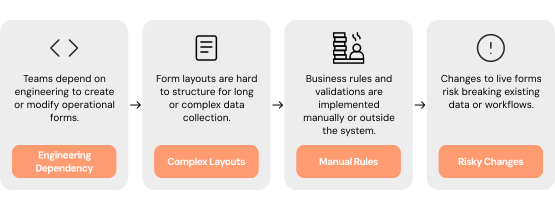
Building and maintaining operational forms requires technical effort, rigid tools, and manual coordination across teams. Simple changes require engineering tickets, complex layouts are difficult to structure, and updates risk disrupting live workflows.

Critical Pain Points
Engineering Dependency
Teams depend on developers to create or modify operational forms.
Rigid Layout Constraints
Form layouts are difficult to structure for long or complex data collection.
Externalized Business Logic
Validations and business rules are implemented manually or outside the system.
Risky Updates
Changes to live forms can break existing data or workflows.
Poor Governance
Access to form creation and editing is not clearly controlled.
Our Solution
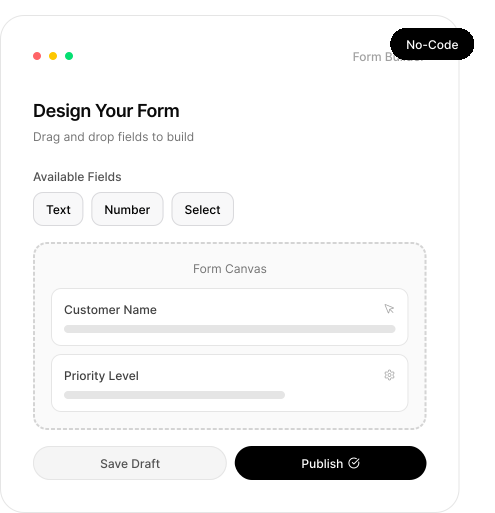
One unified visual builder for operational form design. AutoOps enables non-technical teams to create structured, validated, and workflow-connected forms using an intuitive drag-and-drop interface. Layout, logic, permissions, and publishing controls are managed centrally; without writing code.
Get Started
How it Works
Drag-and-Drop Field Builder
Create fields visually with full configuration control.
Custom labels and help text
Default values and formatting options
Reusable field components
Advanced Layout Control
Structure complex forms with clarity.
Multi-column layout
Sections and grouped fields
Tabbed form navigation
Dynamic Logic & Validation
Embed business intelligence directly into forms.
Conditional visibility rules
Calculated fields and dependencies
Built-in validation enforcement
Backend Data Mapping
Connect forms directly to operational systems.
Direct field-to-table mapping
Workflow trigger integration
Real-time data synchronization
Versioning & Publishing Controls
Update safely without operational disruption.
Draft and publish workflows
Controlled edits to live forms
Rollback to previous versions when needed
Control who can design and modify forms.
Role-Based Access Governance
Permission-based editing rights
Admin-level publishing control
Audit visibility for changes
Who Benefits
Operational impact across teams responsible for data intake, approvals, and workflow execution
Operations Teams
Launch and iterate forms quickly
Reduce reliance on IT
Maintain structured, validated data
Business Process Owners
Implement logic without coding
Adapt forms as requirements evolve
Ensure compliance with internal standards
IT & Engineering Teams
Reduce form-related tickets
Maintain governance without micromanagement
Support scalable, controlled customization
Founders & Business Leaders
Accelerate operational agility
Enable faster experimentation
Scale form-driven workflows confidently
Business Impacts
Reduced Engineering Dependency
Teams build and modify forms independently.
Faster Iteration Cycles
New forms and updates are deployed quickly.
Improved Data Accuracy
Built-in validations and logic reduce errors at submission.
Safe Operational Updates
Versioning prevents disruption to live workflows.
Build and control operational forms, without code.
See how AutoOps transforms operational form design from an engineering bottleneck into a business-controlled capability. Build, govern, and evolve complex forms; without code or workflow disruption.