Relational Table Builder

Transform spreadsheets into structured, operational data in minutes.
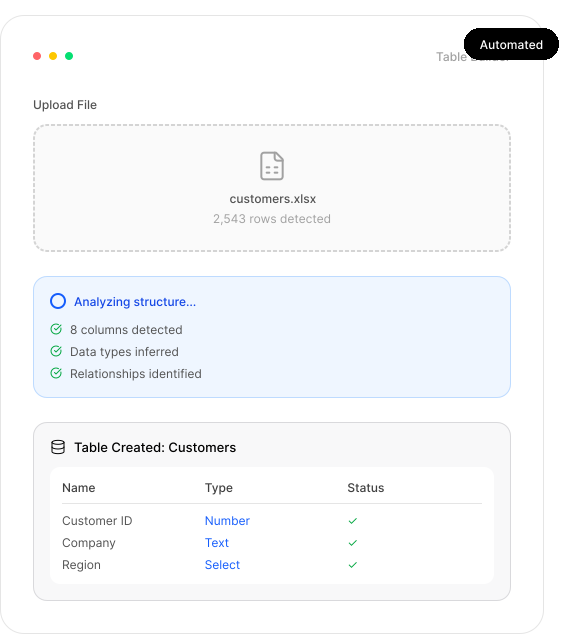
AutoOps enables teams to instantly convert Excel and CSV files into structured, relational data tables without manual schema setup. Operations, finance, and business teams can validate, enrich, and operationalize data at import, turning static files into automation-ready system objects.
The Prolem
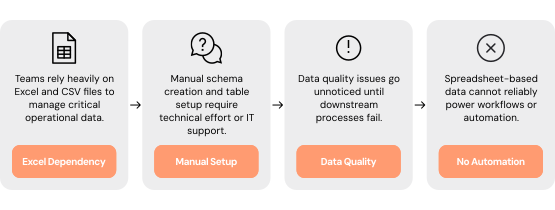
Operational data lives in flat files that are difficult to structure, validate, and operationalize across systems. Teams rely heavily on Excel and CSV files to manage critical business data, but flat files lack relationships and governance. Manual schema setup often requires technical support, and data quality issues surface only after downstream workflows break.

Critical Pain Points
Spreadsheet Dependency
Critical operational data is stored and maintained in disconnected Excel and CSV files.
Manual Schema Setup
Creating structured tables often requires technical effort or IT support.
No Data Relationships
Flat files lack relational structure, making data difficult to scale or connect.
Hidden Data Quality Issues
Inconsistent formats and malformed entries go unnoticed until processes fail.
Limited Automation Readiness
Spreadsheet-based data cannot reliably power workflows, permissions, or analytics.
Our Solution
One configurable operational platform for building relational tables directly from flat files. AutoOps brings data ingestion, validation, enrichment, and structure together into a single system of record where business teams can create and manage operational tables themselves, without engineering support. By unifying structured data, workflows, and governance in one platform, AutoOps transforms spreadsheets into reliable, automation-ready operational assets.
Get Started
How it Works
One-Click Table Creation
Import Excel and CSV files to generate structured tables instantly.
Automatic column detection
Smart data-type inference
No manual schema configuration
Built-In Validation & Cleansing
Data is checked and standardized during ingestion.
Enforce consistent data types
Prevent malformed entries
Improve accuracy at import
Relationship Detection & Structuring
Flat files are converted into relational objects.
Link related datasets automatically
Enable scalable data architecture
Support connected workflows
Enrichment During Import
Rules can enhance and normalize data as it is ingested.
Apply default values and mappings
Standardize attributes
Ensure completeness before use
Immediate Operationalization
Created tables become first-class system objects.
Power workflows and approvals
Drive permissions and access control
Enable analytics and reporting
Auditability & Governance
Audit logs track table creation and modifications.
Maintain data lineage visibility
Support compliance and controls
Strengthen structured governance
Who Benefits
Measurable results across operations, finance, and business teams
Operations Teams
Convert spreadsheets into governed tables
Reduce manual data restructuring
Enable automation without delays
Finance & Data Teams
Improve data quality at ingestion
Standardize reporting inputs
Reduce spreadsheet fragmentation
Business Teams
Create structured data independently
Eliminate reliance on IT for table setup
Accelerate project implementation
Founders & Business Leaders
Modernize legacy data gradually
Reduce operational risk
Build scalable data foundations
Business Impacts
Accelerated Time-to-Value
 Move from raw spreadsheets to usable operational tables in minutes.
Reduced Engineering Dependency
Enable non-technical teams to structure and manage data.
Eliminated Spreadsheet Fragmentation
Consolidate disparate Excel files into centralized tables.
Improved Data Quality from Day One
Prevent inconsistent data from entering workflows.
Your Data Shouldn’t Live In Files. It Should Run Your Operations.
See how AutoOps transforms Excel and CSV files into structured, relational tables with automated validation and enrichment. Eliminate spreadsheet fragmentation, improve data quality, and power workflows instantly; without custom development.